ZekkoCRM's Call Center brings the lead queue, a smart script and real-time AI together on one screen, so every call is prepared, made and logged without leaving the CRM.
Built-in VoIP · Available now
Your rep makes the call. The AI does the rest.
Call queue, a script generated on the spot, the lead's profile before they pick up and real-time support, all inside ZekkoCRM. No improvising. No lost leads.
- One-click calling
- AI script for every call
- Recording inside the CRM
- No external system
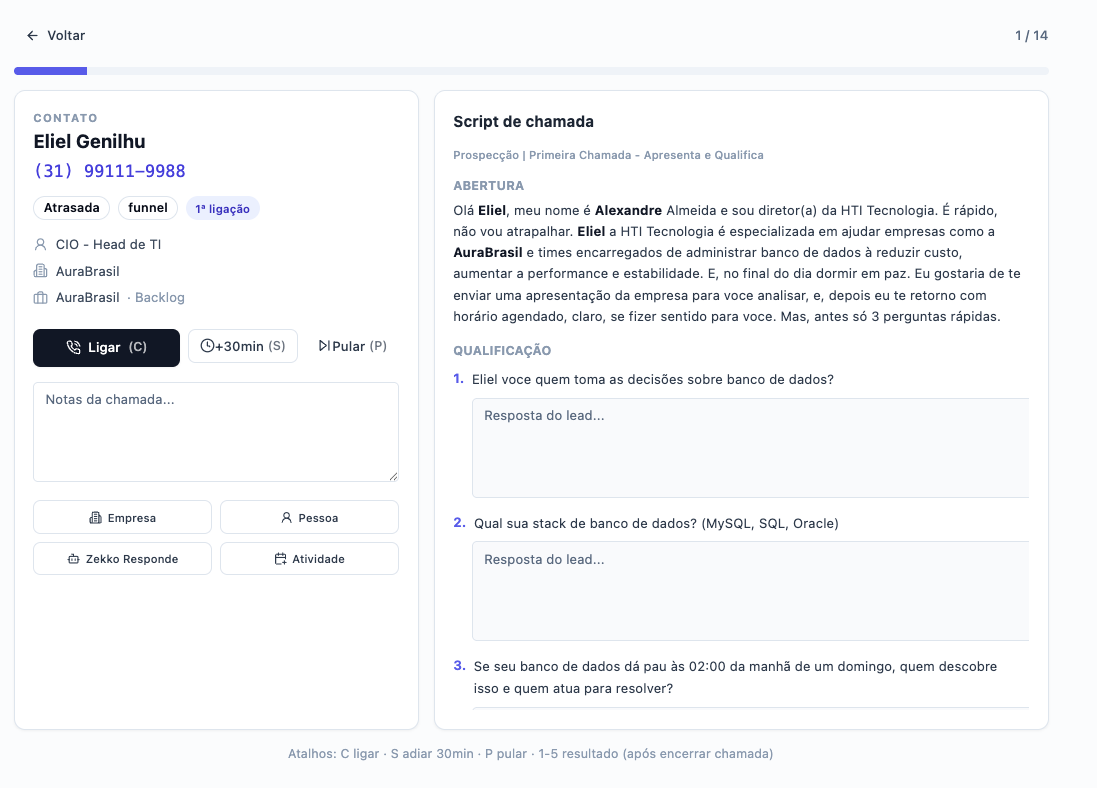
This is not a traditional call center. It's your inside sales team running in expert mode.
From zero to dialing in under 60 seconds
Four steps that turn a pile of leads into conversations that close.
1
Build your queue
Choose to work through today's tasks, overdue tasks or a pipeline stage. The AI suggests the priority order.
2
Pick the script
Use your company's base script, ask the AI to improve it, or create a new one from scratch for that specific session.
3
Call with context
Script and qualification questions on screen. Lead profile one click away. Built-in softphone.
4
Outcome logged automatically
When you hang up, record the call outcome. The recording is linked to the contact. The dashboard updates.
Everything the rep needs. On the same screen.
Smart queue by pipeline
Select any pipeline stage and see exactly how many leads are waiting to be contacted. No spreadsheet, no guesswork.
AI-generated script
The AI writes a personalized script with the lead's name and context. Three modes: base, improved or from scratch.
AI lead profile
Before calling, see the AI-generated profile: role, company, likely priorities and how to adapt your approach.
Real-time AI
During the call, ask the AI how to handle objections or what to argue. Contextual answers, on the spot.
Recording in the CRM
Every call recorded and linked to the contact. Managers can listen to any call without an external system.
Dashboards and reports
Volume per rep, contact rate, average call time and outcome by pipeline stage. All integrated.
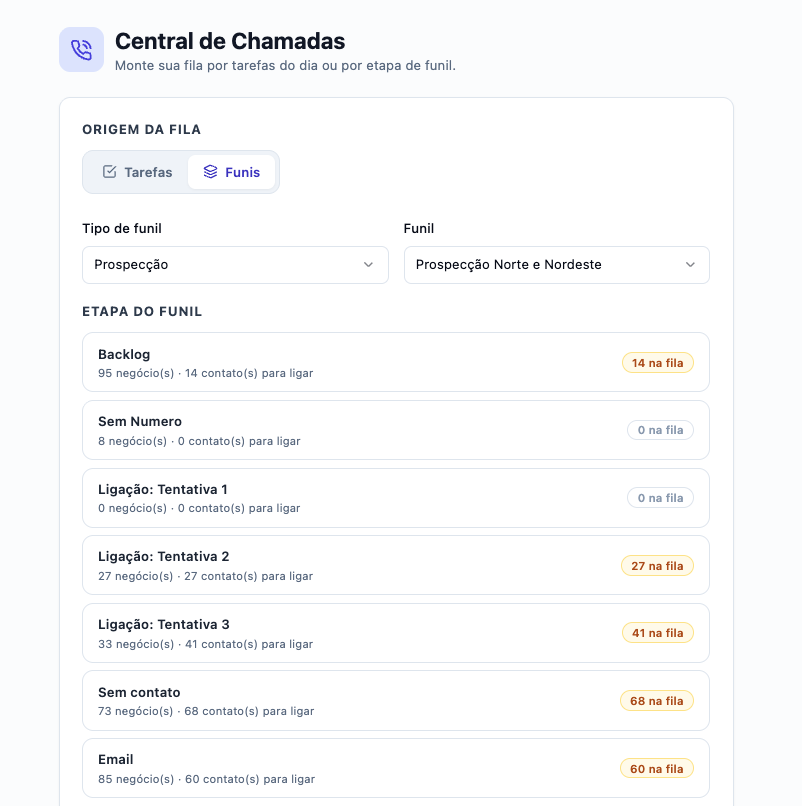
Queue by pipeline
Know exactly who to call, and in what order.
No more starting the day without knowing where to begin. Select the pipeline, pick the stage (Backlog, Attempt 2, No Contact) and see the exact number of contacts waiting in the queue. The Call Center organizes the work so the rep only has to execute.
- Clear view of volume per pipeline stage
- Automatic ordering by priority
- Real-time count of contacts in the queue
- Direct integration with the CRM pipeline
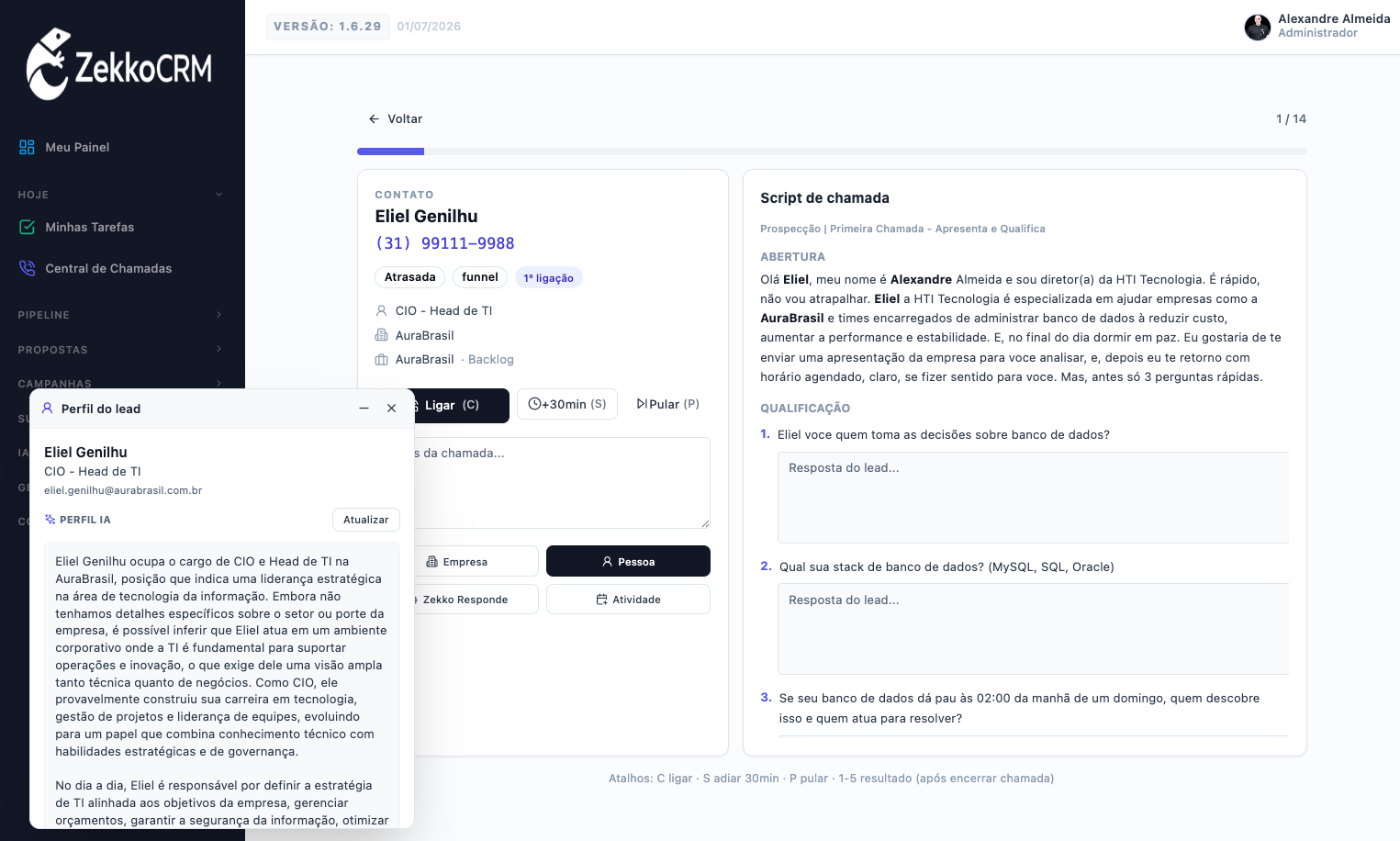
AI lead profile
Understand who you're talking to. Before the first ring.
Before dialing, see an AI-generated summary of the lead: role, company context, likely priorities and how to adapt your approach. You go into the call with context, not guesswork.
Why calling from inside the CRM changes everything
| External dialer | ZekkoCRM Call Center | |
|---|---|---|
| Lead context on screen | Partial | Complete |
| AI-generated script | ||
| Qualification questions | ||
| AI profile before calling | ||
| Real-time AI during the call | ||
| Queue by pipeline and stage | Complex setup | Built in |
| Recording linked to the contact | Extra integration | Built in |
Frequently asked questions
What is a call center inside a CRM?+
It is a feature that lets you make sales calls directly inside the CRM, with the lead's context, an AI-generated script, qualification questions and automatic logging of the outcome, all on the same screen, with no parallel systems.
Do I need a separate phone system to use the Call Center?+
No. ZekkoCRM connects to a VoIP provider for the calls. The setup is done once in your account settings. After that, everything works directly in the CRM with one-click dialing.
Does the AI create the script automatically for each call?+
Yes. Before starting the session you choose one of three modes: use the base script approved by your company (automatically personalized with the lead's name and context), improve the base script with AI for the specific goal of that call, or create a brand-new script from scratch based on the goal you state.
Can I listen to call recordings inside the CRM?+
Yes. Every call is recorded and automatically linked to the contact's record in the CRM. Reps and managers can listen to any call at any time, right on the lead's profile, without an external system.
How does the manager track the calling team's performance?+
Through call dashboards built into the CRM: call volume per rep, contact rate, average call time and outcome by pipeline stage. Everything updates in real time, with no manual spreadsheet.
Does the Call Center work for cold calling?+
Yes, that is exactly what it was built for. The queue by pipeline stage, the AI-generated script and the lead profile before dialing are especially useful in outbound prospecting, where consistent messaging and the number of attempts directly affect results.
Ready to sell more with less effort?
Create your free account in 5 minutes. No credit card.